
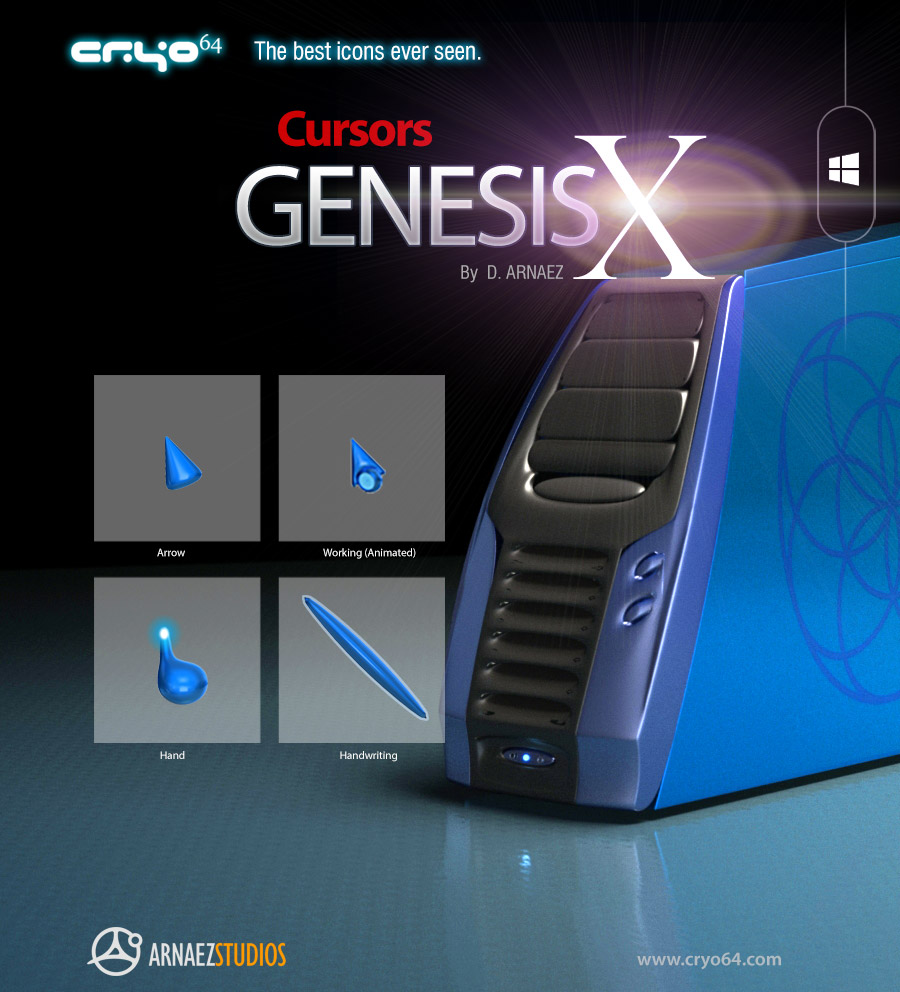
Cursors Genesis X
Genesis X Cursors — Custom 3D Blue Cursor Set for Windows
The Genesis X Cursor Set gives you a complete set of custom cursors for Windows crafted in a sleek, glossy 3D blue style by Cryo64. Every cursor you use every day — from the basic arrow to the animated working spinner — has been redesigned from scratch with the same futuristic precision that defines the Genesis X collection.
These are not flat or low-resolution cursor replacements. Each cursor was modeled and rendered in full 3D, with smooth edges, depth, and a signature electric blue finish that makes every interaction with your desktop feel premium.
Cursors Included
The Genesis X Cursor Set includes all 16 standard Windows cursor states:
- Arrow — the everyday pointer, redesigned in 3D blue
- Help Select — arrow with question mark for help contexts
- Working in Background (Animated) — spinner alongside the arrow for background tasks
- Busy (Animated) — full loading spinner when Windows is working
- Precision Select — crosshair for precise targeting
- Text Select — I-beam for text editing and selection
- Handwriting — stylized pen cursor for writing and drawing
- Unavailable — the “no” cursor for disabled actions
- Vertical Resize — up-down arrow for resizing windows
- Horizontal Resize — left-right arrow for resizing windows
- Diagonal Resize 1 — top-left to bottom-right resize
- Diagonal Resize 2 — top-right to bottom-left resize
- Move — four-way arrow for dragging and repositioning
- Alternate Select — secondary pointer variant
- Link Select (Hand) — for clickable links and buttons
- Location Select — crosshair for location-based interactions
How to Install Custom Cursors on Windows
Step 1 — Download and Extract
Download your ZIP file and extract it to any folder on your computer.
Step 2 — Open Mouse Settings
Go to Control Panel → Mouse → Pointers (Windows 10 / 11). You can also search for “Change how the mouse pointer looks” in the Windows search bar.
Step 3 — Load the Cursor Scheme
Click Browse next to each cursor type and navigate to the extracted folder. Select the matching .cur or .ani file for each cursor state. Click Save As to save it as a new scheme, then click Apply.
System Requirements
- Windows 11 or Windows 10
- No third-party software required — uses native Windows cursor settings
Why Choose Cryo64?
20+ Years of 3D Design for Windows
Since 2004, Cryo64 has been creating premium desktop customization products trusted by users in over 80 countries. Every cursor in this set was hand-rendered with the same attention to detail that has earned millions of downloads on WinCustomize and DeviantArt.
Complete Your Genesis Desktop
The Genesis X Cursor Set is designed to work alongside the full Genesis X and Genesis 11 collections. Pair it with the Genesis 11 Icon Theme, Genesis HUD Wallpaper, and the Genesis Year 2808 Screensaver for a fully unified futuristic desktop.
| Item 1 |
|---|
Only logged in customers who have purchased this product may leave a review.
By D. Arnaez, Arnaez Studios LLC — Miami, FL

Reviews
There are no reviews yet