
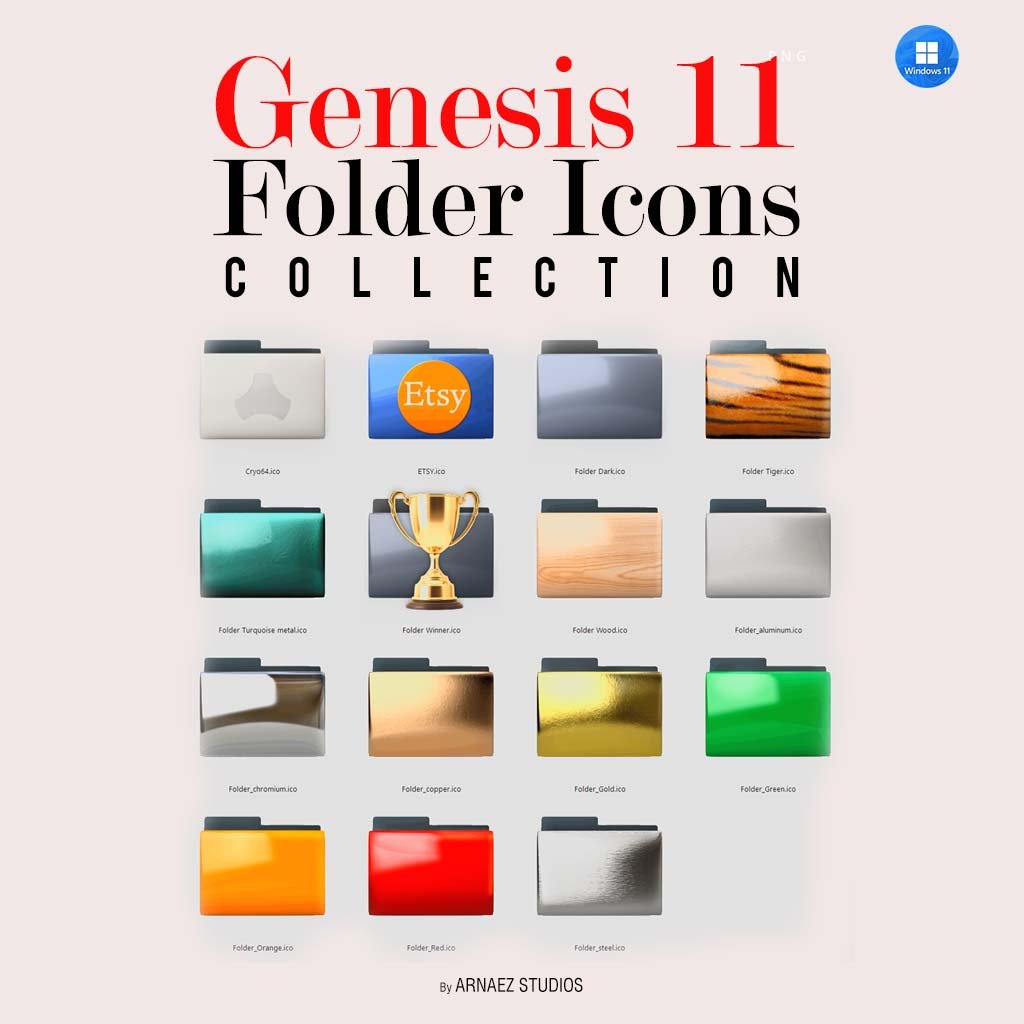
Genesis 11 Folder Icons Collection
Genesis 11 Folder Icons — Replace Your Boring Default Folders
Your desktop icons look amazing. So why settle for plain blue folders? The Genesis 11 Folder Icons collection by Cryo64 gives you 15 hand-crafted 3D folder icons to replace your default Windows folders with something truly unique.
In fact, each folder in this set was designed to match the premium aesthetic of the full Genesis 11 Complete Experience. However, they also look stunning on any desktop — even without the full icon theme.
What’s Inside the ZIP File
The download includes 15 folder icons in both PNG and ICO formats:
Metal & Mineral Finishes
- 🗂️ Folder Aluminum — brushed aluminum texture
- 🗂️ Folder Chromium — mirror-like chrome finish
- 🗂️ Folder Copper — warm copper metallic
- 🗂️ Folder Gold — rich polished gold
- 🗂️ Folder Steel — cool brushed steel
- 🗂️ Folder Turquoise Metal — teal metallic shine
Colors & Textures
- 🗂️ Folder Dark — sleek dark gray edition
- 🗂️ Folder Green — vivid glossy green
- 🗂️ Folder Orange — bold glossy orange
- 🗂️ Folder Red — vibrant glossy red
- 🗂️ Folder Tiger — wild tiger stripe print
- 🗂️ Folder Wood — natural wood grain texture
Special Editions
- 🗂️ Cryo64 — exclusive Cryo64 branded folder
- 🗂️ Folder Etsy — perfect for Etsy sellers
- 🗂️ Folder Winner — trophy edition for your best projects
How to Change Folder Icons on Windows 11
Step 1 — Extract the ZIP File
First, extract the downloaded ZIP to any folder on your computer.
Step 2 — Right-Click the Folder to Change
Next, right-click the folder you want to customize. Then select Properties from the menu.
Step 3 — Apply the New Icon
Go to the Customize tab. Then click Change Icon. Finally, browse to the extracted ICO file and click OK. Your folder will update instantly!
Why These Folder Icons Stand Out
True 3D Rendering
Unlike flat icons, every folder in this set was rendered in full 3D. As a result, you get realistic depth, lighting, and reflections that make your desktop feel alive.
Perfect Match for Genesis 11
These folders were designed specifically to complement the Genesis 11 Icon Theme. Together, they create a fully unified desktop experience. You can also get them as part of the Genesis 11 Complete Experience bundle and save!
Trusted by Millions
Cryo64 has been creating premium desktop icons since 2004. In addition, with millions of downloads across WinCustomize and DeviantArt, Cryo64 is one of the most trusted names in Windows customization worldwide.
Compatible With
- ✅ Windows 11
- ✅ Windows 10
- ✅ Windows 8 / 8.1
Only logged in customers who have purchased this product may leave a review.
By D. Arnaez, Arnaez Studios LLC — Miami, FL

Reviews
There are no reviews yet